Deploy Blueprints with GitHub Actions
Use the official action to deploy your blueprints with GitHub Actions.
The official Blueprints GitHub Actions lets you add Blueprint planning and deployment to your existing GitHub workflows.
Prerequisites
Create a Blueprint
Before you get started, you should have a local blueprint configured and committed to the git repository you want to use. If you’re new to blueprints, you can get started by creating a function.
Before using these actions, you need configuration values from your project. Run the following command to retrieve your project and stack IDs.
npx sanity blueprints config
Current configuration:
  Sanity Project: <project_id>
  Deployment ID:  <stack_id>
Create a Sanity API token
Next you’ll need a Sanity API token with permission to deploy the blueprint.
- Go to sanity.io/manage.
- Select your project or organization. Organization-scoped blueprints will require an organization-level token.
- Go to API → Tokens.
- Select Add API token.
- Create a token with blueprint deploy permissions.
- Copy the token (you won't be able to see it again).
If you’re creating tokens programatically, you’ll need the following permissions:
- Project-scoped:
sanity.project.blueprints.deploy - Organization-scoped:
sanity.blueprints.deploy
Add token to GitHub secrets
Next, add the API token to your GitHub secrets.
- Go to your GitHub repository.
- Navigate to Settings → Secrets and variables → Actions.
- Select New repository secret.
- Name:
SANITY_TOKEN. - Value: Paste your Sanity API token.
- Select Add secret.
Create your workflows
There are two actions available: deploy and plan.
The Deploy action executes sanity blueprints deploy in your GitHub workflow, automatically applying your Blueprint configuration to your Sanity project. It deploys your resources, like functions, and provides a deployment status output for use in your workflow.
Some ways you can use it are:
- On pushes to your main/production branch for continuous deployment.
- As part of a release workflow.
- For scheduled deployments.
- After manual workflow dispatch.
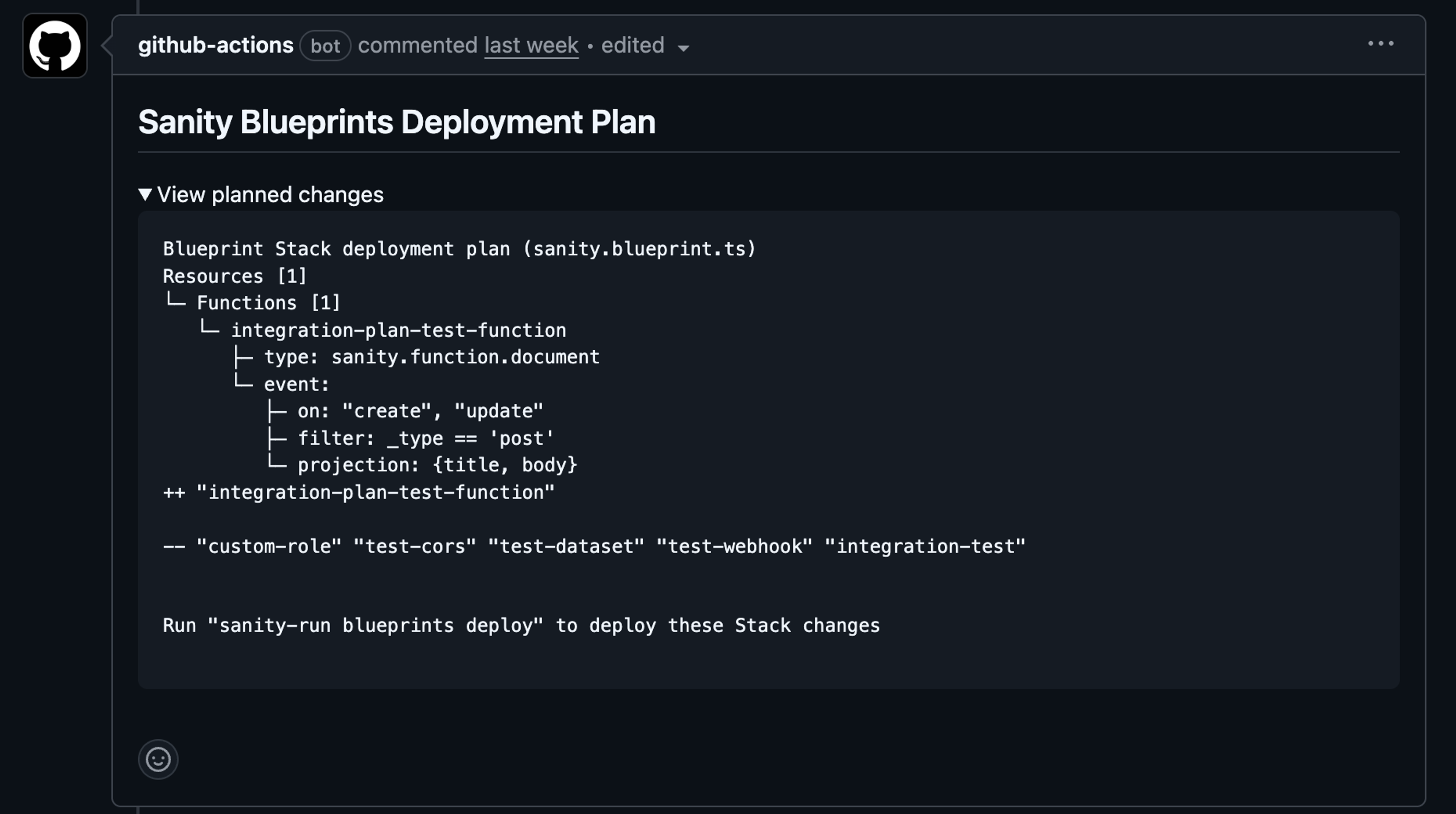
The Plan action runs sanity blueprints plan and automatically posts the results as a PR comment, giving your team visibility into what changes will be applied. It shows specific changes in the resources, as well as a summary of all changes.
Some ways you can use it are:
- Confirm what a blueprint will do before deploying.
- Automatically post results as a collapsible PR comment.
- Keep your PR discussions clean and organized.
Create a Deploy workflow
Create .github/workflows/deploy-blueprints.yml. Replace the stack and project ID placeholders with your values.
name: Deploy Sanity Blueprints

on:
  push:
    branches:
      - main

jobs:
  deploy:
    runs-on: ubuntu-latest
    steps:
      - name: Checkout repository
        uses: actions/checkout@v5

      - name: Install dependencies
        run: npm ci  # or pnpm/yarn

      - name: Deploy blueprints
        uses: sanity-io/blueprints-actions/deploy@deploy-v3
        with:
          sanity-token: ${{ secrets.SANITY_TOKEN }}
          stack-id: 'ST_1234xyz'
          project-id: '1234xyz'
          # organization-id: '1234xyz' # if you're deploying an org-scoped blueprint
Create a Plan workflow
Create .github/workflows/plan-blueprints.yml. Replace the stack and project ID placeholders with your values.
name: Sanity Blueprints Plan

on:
  pull_request:

permissions:
  contents: read
  pull-requests: write  # Required for posting comments

jobs:
  plan:
    runs-on: ubuntu-latest
    steps:
      - name: Checkout repository
        uses: actions/checkout@v5

      - name: Install dependencies
        run: npm ci  # or pnpm/yarn

      - name: Plan blueprints changes
        uses: sanity-io/blueprints-actions/plan@plan-v2
        with:
          sanity-token: ${{ secrets.SANITY_TOKEN }}
          stack-id: 'ST_1234xyz'
          project-id: '1234xyz'
          # organization-id: '1234xyz' # if you're planning an org-scoped blueprint
Custom working directory
If your blueprint isn’t at the root of your repository, add working-directory.
name: Sanity Blueprints Plan

on:
  pull_request:

permissions:
  contents: read
  pull-requests: write  # Required for posting comments

jobs:
  plan:
    runs-on: ubuntu-latest
    steps:
      - name: Checkout repository
        uses: actions/checkout@v5

      - name: Install dependencies
        run: npm ci  # or pnpm/yarn

      - name: Plan blueprints changes
        uses: sanity-io/blueprints-actions/plan@plan-v2
        with:
          sanity-token: ${{ secrets.SANITY_TOKEN }}
          stack-id: 'ST_1234xyz'
          project-id: '1234xyz'
          working-directory: 'path/to/blueprints'
Use deployment status in workflow
The deploy action logs the deployment progress and provides a deployment-status output you can use in subsequent workflow steps. For example:
- name: Deploy blueprints
  id: deploy
  uses: sanity-io/blueprints-actions/deploy@deploy-v3
  with:
    sanity-token: ${{ secrets.SANITY_TOKEN }}
    stack-id: 'ST_1234xyz'
    project-id: '1234xyz'

- name: Notify on success
  if: steps.deploy.outputs.deployment-status == 'success'
  run: echo "Deployment successful!"
Configuration Reference
Requiredsanity-token
string
A Sanity API token with deploy permissions.
Requiredstack-id
string
The blueprint stack ID. Find this by running
sanity blueprints configto view the active stack, orsanity blueprints stacksview all current stacks.Requiredproject-id
string
Sanity project ID. Find this by running
sanity blueprints configor in your project settings at sanity.io/manage. Only use when not using an organization-id.Requiredorganization-id
string
Set the Sanity organization ID for organization-scoped stacks. Only use when not using a project-id.
working-directory
string
Path to the directory containing your blueprint config (
sanity.blueprint.ts). Defaults to the repository root.
Visit the GitHub Actions Repository for additional details.