Copy as markdown support, additional keyboard shortcuts
Published: December 11, 2025
v2025-12-11
✨ Minor updates
Loading...
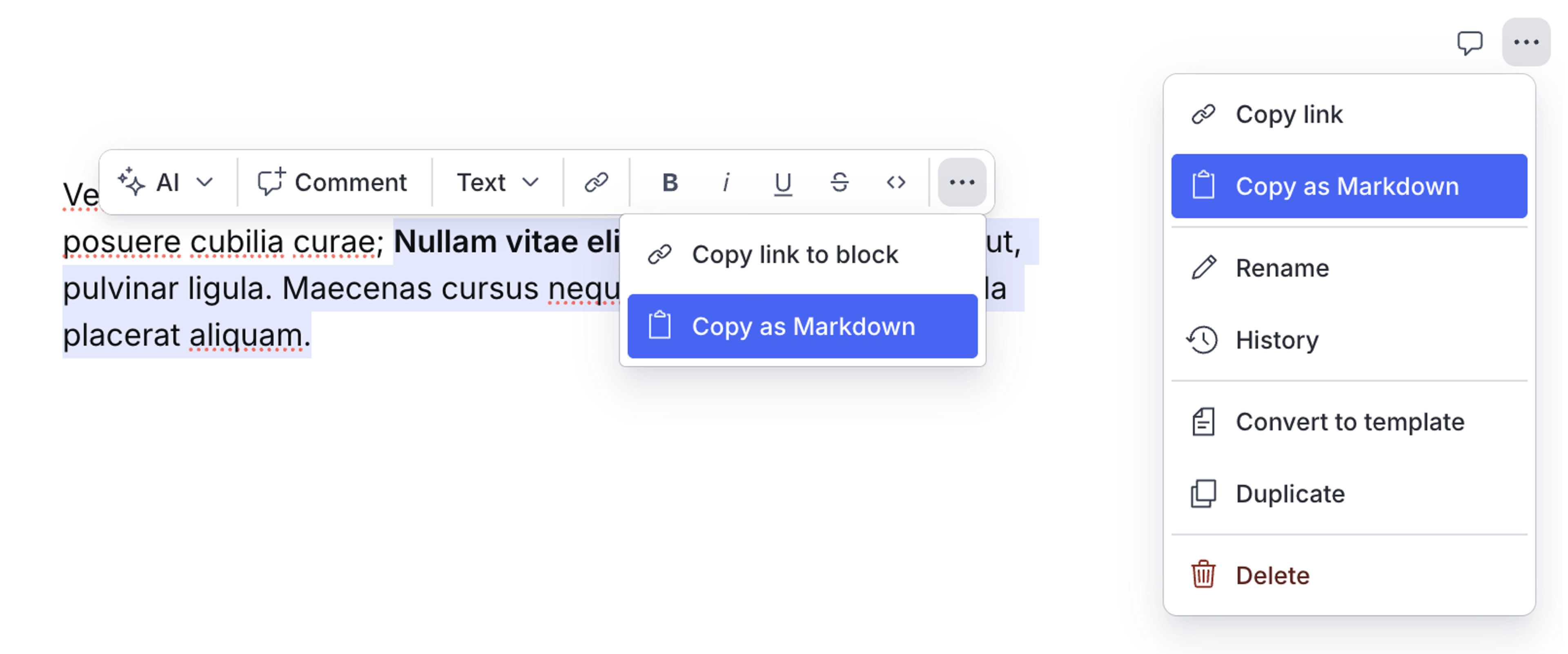
- It's now possible to copy content as Markdown:
- Copy the entire document via the document context menu (in the top RHS)
- Alternatively, copy a custom selection by first highlighting content and accessing the button via the popover menu
- Added keyboard shortcuts for the following actions (Mac / Windows):
⌥+⌘+0/Ctrl+Alt+0: apply normal text style at selection⌥+⌘+1/Ctrl+Alt+1: apply heading 1 at selection⌥+⌘+2/Ctrl+Alt+2: apply heading 2 at selection⌥+⌘+3/Ctrl+Alt+3: apply heading 3 at selection⌥+⌘+4/Ctrl+Alt+4: apply heading 4 at selection⌥+⌘+5/Ctrl+Alt+5: apply heading 5 at selection⌥+⌘+6/Ctrl+Alt+6: apply heading 6 at selection
- Minor UX improvements to autocomplete components
🐛 Notable bugfixes
- Fixes an issue where triggering rewrite or task actions via keyboard shortcuts would clear selected text
- Workspace + organization icons should now render consistently with those seen in Dashboard