Authentication and tokens
How to create tokens and make authenticated requests.
By default, unauthenticated users have read access to published documents (with some exceptions like private datasets). However, if you want to access draft documents or make modifications you will need to authenticate yourself as a project member with write access.
Personal tokens
Sanity uses tokens for authentication, which are generated when you log in and then attached to all API requests in the HTTP Authorization header, for example:
Authorization: Bearer skE5UXUmBEy7U50jcG4In4v4xoHZTlduDxQYet8Y84tsTqAZxp2reIPJsA1JzqXJno2qcpauGwPfjHpUThe content studio handles this for you automatically when you log in, and the command-line tool will generate and store a personal token when you run sanity login.
Gotcha
Without intervention, personal tokens last for one year (if using SAML SSO, the lifetime of the token is shorter). After logging out of the Sanity CLI, the subsequent login generates a new personal token and invalidates the old one.
Child tokens issued to MCP clients are tied to your active CLI session. Logging out invalidates them along with the parent personal token.
If you want to run authenticated API requests manually with e.g. curl, you can find your personal API token by running sanity debug --secrets, and look for the "Auth token" value under "Authentication". You then place this in an Authorization header:
curl -H "Authorization: Bearer <token>" https://<project>.api.sanity.io/v2021-06-07/data/query/production?query=*
Protip
Your API token is personal, and gives complete access to the Sanity API as your user. Take care not to share it with anyone, and use robot tokens instead to authenticate from applications and third-party services.
Robot tokens
If you need to authenticate with the Sanity API from an application or third-party service, you should generate a dedicated robot token for it, with appropriate permissions.
Organization-wide tokens
Organization-wide robot tokens are used for scenarios where you need access to manage multiple projects, deploy or manage SDK apps, or access data in organization-wide Sanity apps like Media Library or Canvas.
To create an organization token, you must have developer or equivalent role in the organization. Navigate to your organization’s management console, then select API > Tokens and use the Add new token button to open the creation dialog.
Project tokens
Project robot tokens can only perform actions on an individual project.
To create a robot token, you must have developer, admin, or an equivalent custom role in the project. Navigate to your project's management console, then go to Settings > API > Tokens and use the Add new token button to open the token creation dialog.
Using a separate token for each application makes it easier to replace it or revoke access, if necessary.
Once a token is generated, it will be displayed exactly once—be sure to make a secure copy of it, since it is not possible to recover the token later. You can then use the token in API requests as outlined above.
Gotcha
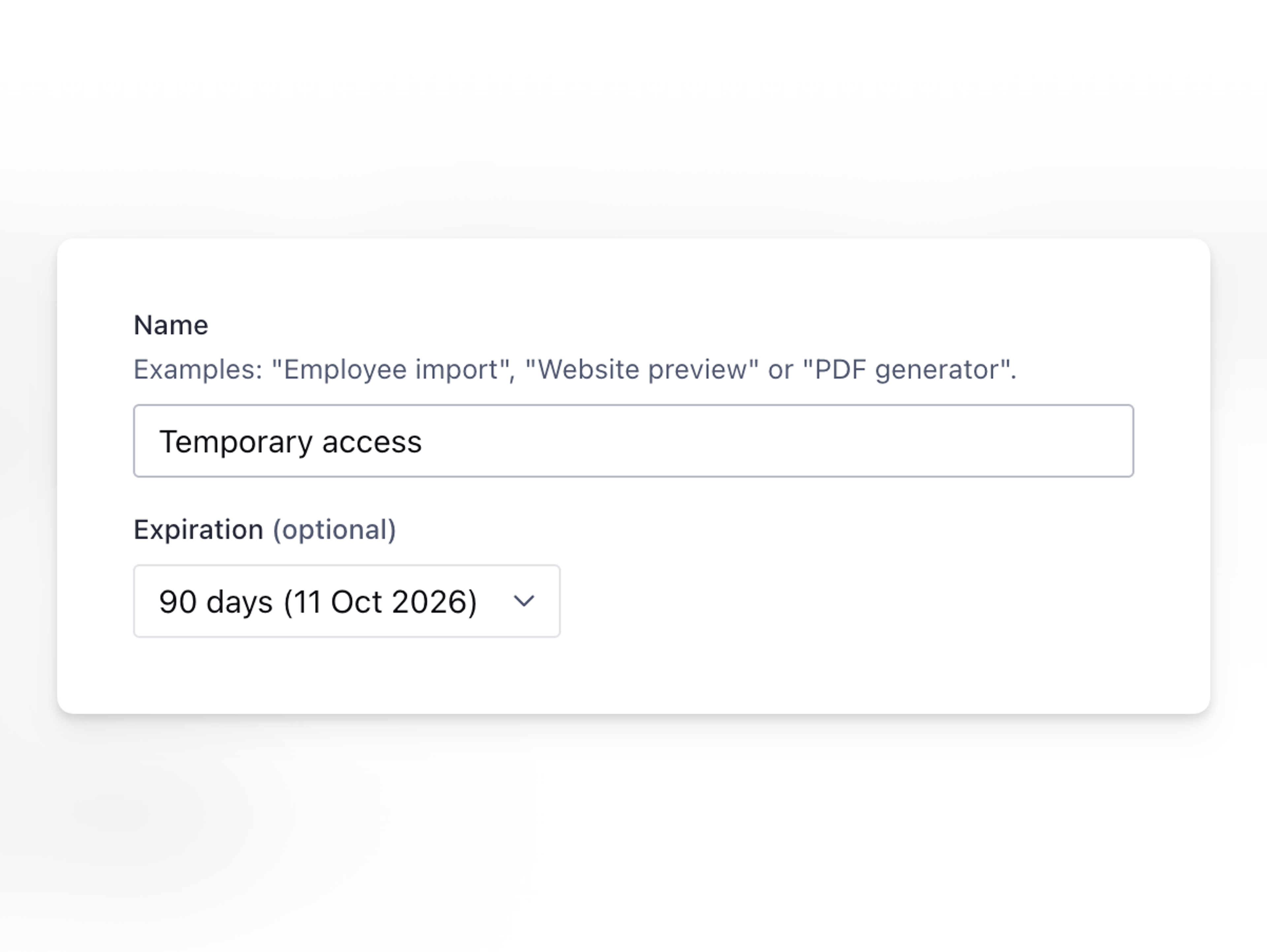
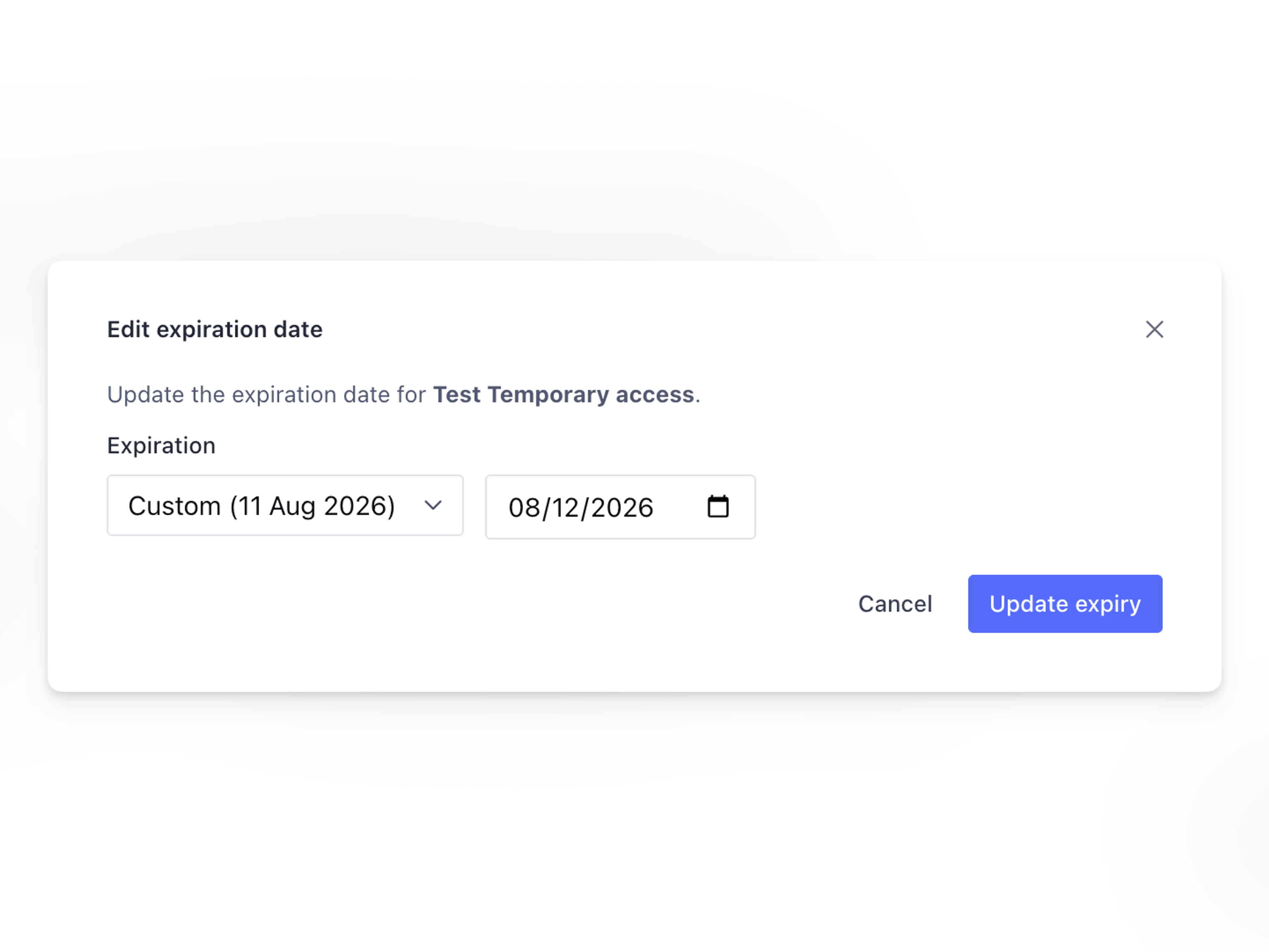
Robot tokens last until deleted by default. As of June 2026, you can set an expiration date when you create a token, or add one to an existing token from the token's three-dot menu in the management console. Choose from 30-, 60-, or 90-day presets, or set a custom date. Expired tokens are rejected; they cannot be reactivated.
Use descriptive names, prune unused tokens, and see Token rotation below for operational guidance.
Not all APIs allow robot tokens
Some APIs are only available for use with personal auth tokens. In these cases, their documentation will explicitly call out that a personal token is required.
Securing your API token
After setting up your token, it's important to keep this secure and not in a publicly-visible space, such as code committed to GitHub or Bitbucket. When deploying code that needs your API token, many hosting companies provide ways of creating environment variables. These variables are stored securely on your host's server and are not stored in plain text in a repository.
Token rotation
Rotating tokens limits the blast radius if a token is leaked or a compromised environment is detected. Setting an expiry on a robot token guarantees the old credential stops working on schedule, but issuing its replacement is still up to you; without an expiry set, rotation depends entirely on operational discipline.
Why rotate tokens
A leaked or stale token is an open door until it's revoked. Rotation shortens the window an attacker can use any single credential. The OWASP Secrets Management Cheat Sheet recommends regular rotation for machine credentials like API tokens and service-account keys, on the grounds that any stolen credential then only works for a short time. For Sanity specifically, setting expiresAt on a robot token guarantees the credential stops working on a fixed date, rather than relying on a rotation schedule you have to remember.
Choose a rotation cadence
The management console presets (30, 60, or 90 days) are reasonable starting points. Pick a cadence based on the token's exposure and the cost of replacement:
- 30 days: public-facing services, third-party integrations, or any environment where credential leakage risk is higher than usual.
- 60 to 90 days: internal trusted services with limited exposure (build pipelines, internal tools running in private networks).
- Custom date: tokens that need to align with a project deadline, vendor contract, or a shorter audit cycle.
Programmatic callers can pass any ISO 8601 datetime; the presets are a UI convenience.
Set expiry when creating a token
From the management console: navigate to Settings > API > Tokens, select Add new token, then choose 30, 60, or 90 days, or set a custom date.
From the Access API: send a POST to the robots endpoint with an expiresAt field.
curl -X POST \
  "https://api.sanity.io/v2026-07-10/access/project/<projectId>/robots" \
  -H "Authorization: Bearer $SANITY_TOKEN" \
  -H "Content-Type: application/json" \
  -d '{
    "label": "build-pipeline",
    "memberships": [{
      "resourceType": "project",
      "resourceId": "<projectId>",
      "roleNames": ["viewer"]
    }],
    "expiresAt": "2027-01-01T00:00:00.000Z"
  }'

# Response includes the secret token (returned once), plus id, tokenId, expiresAt.
Update expiry on an existing token
From the management console: open the three-dot menu next to a token in Settings > API > Tokens and adjust the date.
From the Access API: send a PUT to the same robot's endpoint. The PUT endpoint accepts expiresAt and no other fields: to change a token's label or memberships, create a new token and delete the old one.
curl -X PUT \
  "https://api.sanity.io/v2026-07-10/access/project/<projectId>/robots/<robotId>" \
  -H "Authorization: Bearer $SANITY_TOKEN" \
  -H "Content-Type: application/json" \
  -d '{"expiresAt": "2027-04-01T00:00:00.000Z"}'
You cannot remove an expiry once set
After a token has an expiresAt value, you can move the date forward or backward while the token is still active, but you cannot return the token to never-expires. Once a token expires, it is rejected permanently; extending the date does not reactivate it. If you need an unbounded token, leave the expiry unset at creation.
Rotate a robot token without downtime
Tokens can be rotated with no service interruption by overlapping the old and new credentials. The recommended sequence:
- Create a new robot token with the same memberships as the existing one, via the management console or
POST .../robotson the Access API. Capture the secret immediately. - Deploy the new token to your environment configuration (environment variables, secrets manager, or equivalent).
- Wait for an overlap window, typically 24 to 48 hours, so that any in-flight requests, cached configurations, or replicas pick up the new token. If your services log outbound requests, confirm the old token has stopped appearing before you delete it.
- Delete the old token:
DELETE .../robots/<oldRobotId>(management console or Access API). The old token is revoked immediately and rejected on subsequent requests.
Because the Access API PUT endpoint only accepts expiresAt, role or membership changes always follow this create-and-delete pattern; you cannot mutate a token's permissions in place. Rotation is also a natural checkpoint for least privilege: grant the new token only the roles the service still needs.
Compromised tokens: delete first, rotate after
The overlap sequence is for routine rotation. If a token has leaked or you suspect compromise, delete the token immediately to cut off access, accept the interruption, and restore service with a new token afterward.
Detect expiration before it happens
The Access API GET .../robots endpoint returns an expiresAt field for each token. A scheduled job that walks the list and alerts on tokens within N days of expiry gives you time to rotate before requests start failing.
Requests made with an expired token are rejected with an HTTP 401 authentication error. Treat expiry rejections the same as any other auth failure path in your client: surface a clear error, prompt for credential rotation, and avoid burying the failure in retry loops.
The sanity tokens CLI does not yet support expiry flags
As of @sanity/cli@7.2.3, sanity tokens supports add, list, and delete but does not expose an expiry flag. Set and manage expiry through the management console or the Access HTTP API for now.