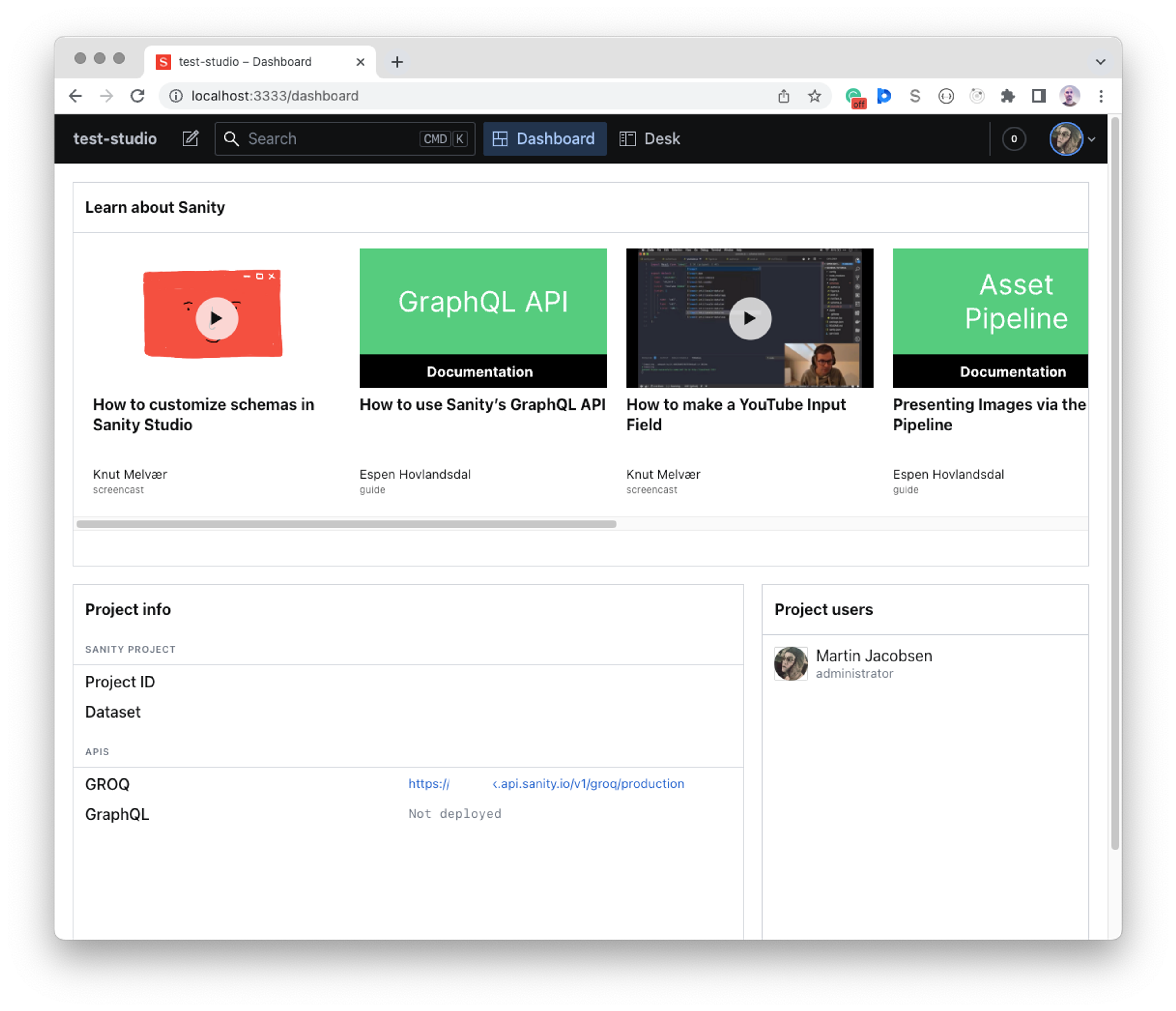
The Dashboard tool for Sanity Studio
How to set up and configure the Dashboard tool for Sanity Studio
Looking for Sanity Dashboard?
This article is about the Dashboard tool for Sanity Studio. For Sanity Dashboard, the unified content operations workspace, see the Sanity Dashboard documentation.
The Dashboard tool is a Sanity Studio plugin that lets you add widgets that display information about your content, project details, or anything else you'd want to put there. You can find widgets on the Sanity Exchange and install them in your project using your preferred package manager, such as npm or yarn. You can also write your custom project-specific widgets.
Widgets are useful for displaying stats about your content, listing recently edited or stale documents, or anything else that helps the people who log in to your studio.
The Dashboard tool has been designed to be as generic as possible, making few assumptions about its widgets. The Dashboard tool itself is mostly concerned with the layout of the configured widgets. You set the layout and order of the widgets, and each widget's options, where you add the Dashboard tool to your studio configuration.
Prerequisites
To install the current version of the Dashboard tool, you need:
- Sanity Studio v5 or later. For Studio v3 or v4, install
@sanity/dashboard@5instead. - React 19.2 or later.
Installation
If you started a project from sanity.io/templates, you might already have the Dashboard tool installed. To install it in an existing project, follow the same procedure as for any other package:
In your project’s root folder, install the package:
npm install --save @sanity/dashboard
pnpm add @sanity/dashboardyarn add @sanity/dashboardbun add @sanity/dashboardThen add the Dashboard tool to your studio configuration, typically found in sanity.config.ts or sanity.config.js at the root of your project:
import { defineConfig } from "sanity";
import { dashboardTool } from "@sanity/dashboard";
export default defineConfig({
    /* ... */
    plugins: [
        dashboardTool({ widgets: []})
    ]
})
To verify that the installation worked, start your studio (npx sanity dev) and point your browser to http://localhost:3333/dashboard. It shows an empty dashboard with the message “Add some widgets to populate this space.”
Choose which tool opens first
Sometimes you want the Dashboard tool to be the first thing people see when they log in to your studio, and sometimes the Structure Tool. The studio opens whichever tool comes first in the plugins array in sanity.config.ts.
Configure the Dashboard tool
Add the widgets you want to the Dashboard tool configuration. The Dashboard tool provides three widgets out of the box:
import { defineConfig } from "sanity";
import {
  dashboardTool,
  sanityTutorialsWidget,
  projectUsersWidget,
  projectInfoWidget,
} from "@sanity/dashboard";

export default defineConfig({
  /* ... */
  plugins: [
    // configure the dashboard tool with widgets
    dashboardTool({
      widgets: [
        sanityTutorialsWidget(),
        projectInfoWidget(),
        projectUsersWidget(),
      ],
    }),
  ],
});
To configure a widget, pass it a configuration object. For example, this sets the width of the project users widget:
projectUsersWidget({ layout: { width: 'small' } })The widgets array sets which widgets the Dashboard tool renders, in the order they appear in the array. The Sanity tutorials, project info, and project users widgets ship with the Dashboard tool and require no separate installation.
Reorder the widgets array to change the layout.
Some widgets have widget-specific options to change aspects of their behavior. If you install the sanity-plugin-dashboard-widget-document-list widget, you can configure it with:
import { documentListWidget } from "sanity-plugin-dashboard-widget-document-list";

documentListWidget({
  showCreateButton: true,
  limit: 5,
  types: ["my-document-type"],
})
You can add multiple instances of a widget with different configurations. So, if you want your dashboard to display both the newest documents across all document types and another widget showing the last edited books, your Dashboard tool configuration might look like this:
dashboardTool({
  widgets: [
    documentListWidget({title: 'New', order: '_createdAt desc'}),
    documentListWidget({
      title: 'Last edited books',
      order: '_updatedAt desc',
      types: ['book'],
    }),
  ],
})