Incoming reference decoration
Display incoming references directly in a document's form, without storing the data as part of the document.
Sanity Studio's inline incoming references feature lets you define a component that displays any incoming references to the current document.
Unlike a field containing an array of references, these incoming references are not part of the document and display automatically when new references are made.
Prerequisites:
- Studio v5.8.0 or later is required to use incoming reference fields.
Add an inline incoming reference decoration
To add incoming references to a document type, return defineIncomingReferenceDecoration from the type's renderMembers function.
import {defineType} from 'sanity'
import {defineIncomingReferenceDecoration} from 'sanity/structure'

export default defineType({
  name: 'author',
  type: 'document',
  renderMembers: (members) => {
   return [
     ...members,  // Places the decoration after all existing fields.
     defineIncomingReferenceDecoration({
       name: 'incomingReferences',
       title: 'Posts by this author',
       types: [{type: 'post'}],
     }),
   ]
  },
 fields: [],
})
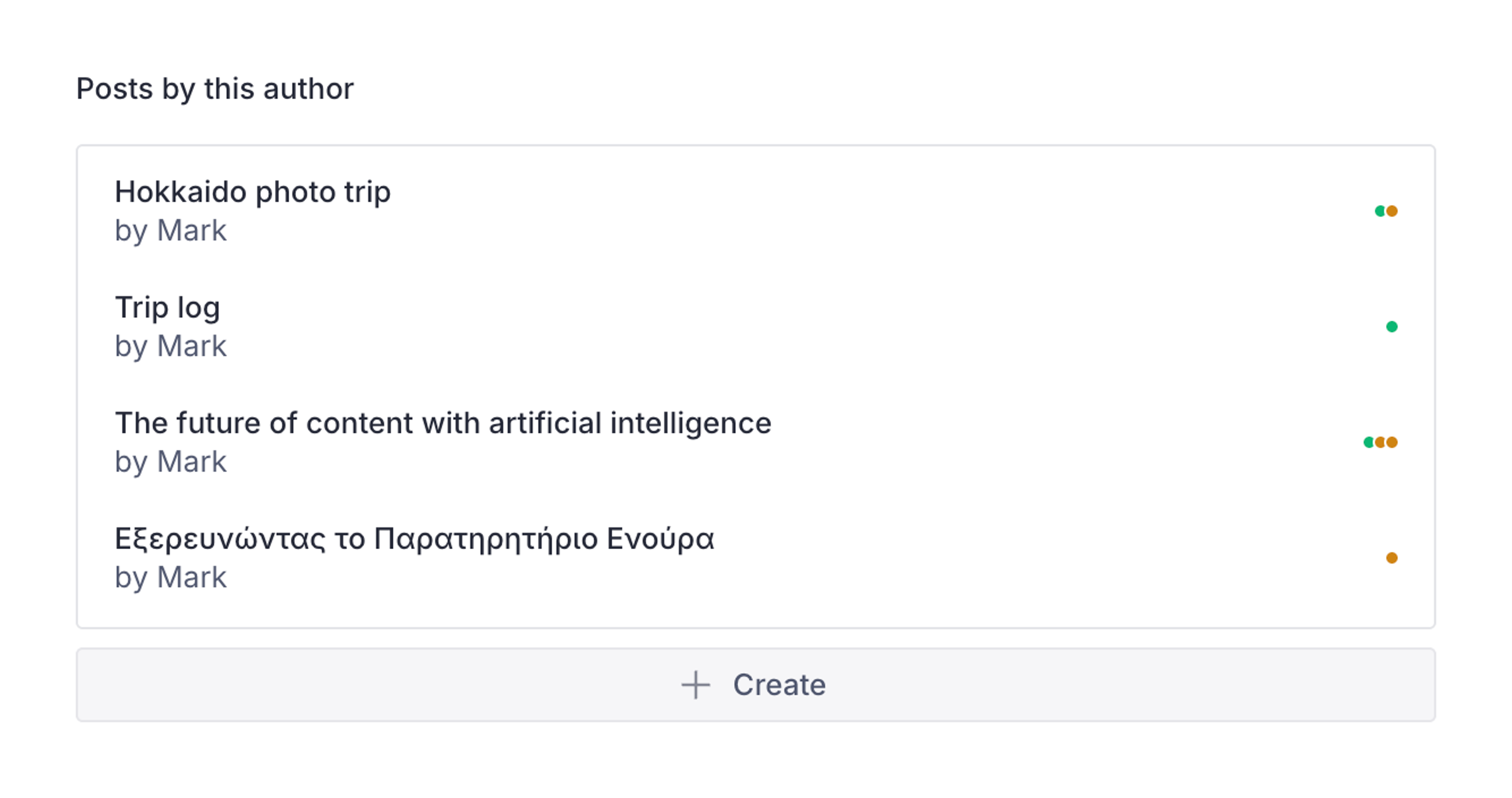
This adds a component to the document form that looks like the following:
Create and reference new documents
You can allow the Create button to pre-populate a new document with a reference to the source document.
This feature can use the initialValue of a new document to set the reference. On the schema for the referencing document type, use the isIncomingReferenceCreation helper to check if an incoming reference field is creating the new document. Then pass in the reference to the appropriate field. In this example, the book document type references the author type.
import {defineField, defineType} from 'sanity'
import {isIncomingReferenceCreation} from 'sanity/structure'

export default defineType({
  name: 'book',
  type: 'document',
  fields: [
    defineField({name: 'author', type: 'reference', to: [{type: 'author'}]}),
    // ...
  ],
  initialValue: (params) => {
    return {
      author: isIncomingReferenceCreation(params) ? params.reference : undefined,
    }
  },
})
Link existing documents
If you have existing documents that you want to search for and assign to the current document, use the onLinkDocument option.
import {defineField, defineType} from 'sanity'
import {defineIncomingReferenceDecoration} from 'sanity/structure'

export default defineType({
  name: 'author',
  type: 'document',
  renderMembers: (members) => {
   return [
     ...members,
     defineIncomingReferenceDecoration({
      name: 'booksCreatedByThisAuthor',
      types: [{type: 'book'}],
      onLinkDocument: (document, reference) => {
        return {
         ...document,
         author: reference, // <-- the reference is passed to the document
        }
      },
    }),
   ]
  },
  fields: [
    defineField({type: "string", name: "name"}),
   // ...
  ]
})
Create custom actions
You can also pass custom actions to the incoming reference decoration. This format is similar to document actions, but occurs in the defineIncomingReferenceDecoration helper. This example creates an action in ReferenceActions.tsx and applies it in the actions array.
import {defineType} from 'sanity'
import {defineIncomingReferenceDecoration} from 'sanity/structure'
import {RemoveReferenceAction} from './ReferenceActions'

export default defineType({
  name: 'author',
  type: 'document',
  renderMembers: (members) => {
   return [
     ...members,
     defineIncomingReferenceDecoration({
       name: 'incomingReferences',
       title: 'Incoming references',
       types: [{type: 'book'}],
       actions: [RemoveReferenceAction]
     }),
   ]
  },
 fields: [],
})
import {TrashIcon} from '@sanity/icons'
import {type IncomingReferenceAction} from 'sanity/structure'
import {getDraftId} from 'sanity'
import {useState} from 'react'
export const RemoveReferenceAction: IncomingReferenceAction = ({document, getClient}) => {
const [dialogOpen, setDialogOpen] = useState(false)
const client = getClient({apiVersion: '2025-10-01'})
return {
label: 'Remove reference',
icon: TrashIcon,
tone: 'critical',
dialog: dialogOpen
? {
type: 'confirm',
message: 'Are you sure you want to remove the reference?',
onCancel: () => setDialogOpen(false),
onConfirm: async () => {
const draftId = getDraftId(document._id)
await client
.transaction()
.createIfNotExists({...document, _id: draftId})
.patch(draftId, (patch) => patch.unset(['author'])) // Removes the reference
.commit()
setDialogOpen(false)
},
}
: null,
onHandle: () => setDialogOpen(true),
}
}Support cross-dataset references
Cross-dataset references are also supported. For each type in another dataset, set dataset and preview, and optionally title and studioUrl:
import {defineType} from 'sanity'
import {defineIncomingReferenceDecoration} from 'sanity/structure'

export default defineType({
  name: 'author',
  type: 'document',
  renderMembers: (members) => {
   return [
     ...members,
     defineIncomingReferenceDecoration({
       name: 'incomingReferencesCrossDataset',
       title: 'Books from the test-us dataset',
        types: [
          {
            type: 'book',
            dataset: 'test-us',
            title: 'Book in test-us dataset',
            studioUrl: ({id, type}) => {
              return type ? `/us/intent/edit/id=${id};type=${type}` : null
            },
            preview: {
              select: {title: 'title', media: 'coverImage', subtitle: 'publicationYear'},
            },
          },
        ]
     }),
   ]
  },
 fields: [],
})
The studioUrl function receives the referencing document's id and type and returns a URL for that document. The incoming reference preview opens the URL in a new tab, and shows no link if the function returns null. Point the URL at the studio workspace that edits the other dataset. In this example, that workspace is mounted at /us.
Configure additional options
The defineIncomingReferenceDecoration helper also accepts the following options:
description
string
Text displayed below the decoration's title.
filter
string | function
A GROQ filter applied to incoming references in addition to the type filter. The
_typefilter is applied automatically. To build the filter from the current document, pass a function that receives{document, getClient}and returns a filter string or{filter, filterParams}.filterParams
Record<string, string>
Parameters for the GROQ filter. When a
filterfunction returns its ownfilterParams, those are used instead.creationAllowed
boolean | string[]
Controls the Create button. Defaults to
true, which allows creating documents from any initial value template of the type. Set tofalseto only allow linking existing documents, which requiresonLinkDocument. Pass an array of template IDs to allow only those templates.
Next steps
- To learn more about the action format, see Document actions.
- To set default values for documents created from the Create button, see Initial Value Templates.